

Subscriptions API
Subscribe cohort(s) of patients to Signal for ongoing monitoring.
Overview
The Subscriptions API is used to create and manage cohort(s) of patients that you would like to subscribe to Signal. By subscribing patient(s) to Signal, you automatically subscribe them to all Signal Alerts . If for any reason you do not want to receive all Signal Alerts, you can limit the alerts that you receive and process when setting up your callback endpoints for webhook notifications.
The Subscriptions API is only necessary if you want to specify a subset of patients to monitor. If you want to monitor ALL of your patients, you can reach out to your Particle representative to automatically enable Signal for all patients for your organization.
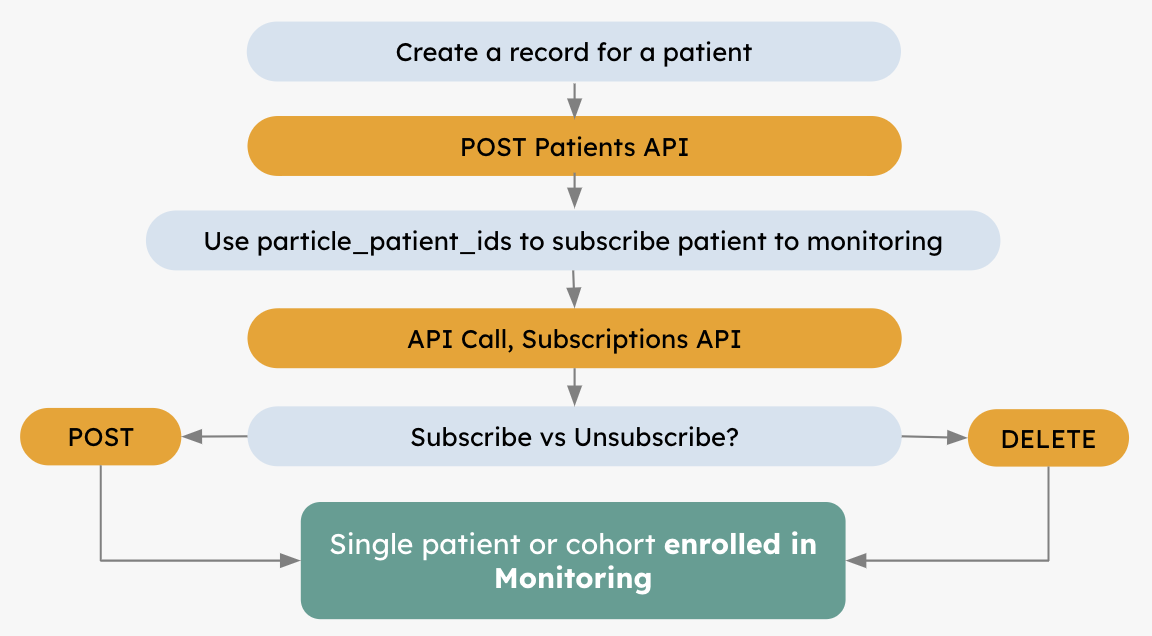
Subscriptions API Workflow
Important Notes
- A Particle Patient ID must be generated for a patient by uploading the patient's demographics via the Patients API before you can subscribe the patient to Signal via the Subscriptions API.
- You can opt to subscribe either a cohort of patients or a single patient in Signal.
- If you want to stop monitoring a patient, you can unsubscribe from notifications for that patient using the Delete Patient Subscriptions API. Do not delete the patient from the Patients API.
- Particle will continue to monitor any patients that you don't explicitly unsubscribe from Signal.
ADTs
- You must be contracted with an ADT partner in order to receive ADT notifications. Contact your Particle representative for more information on how to set up ADTs.
- Note that when you subscribe / unsubscribe patients in Signal, these changes will only be effective for your ADT fees at the start of the following month. For example, if a patient subscription is created on January 5th, Signal will start on February 1st.
Create Patients
The first step to subscribe a cohort of patients to Signal is to create a record for each patient you want to monitor by calling the Patients API. Particle will return a Particle Patient ID for the patient, which you will need to provide when subscribing the patient to Signal.
Subscribe to Signal
Once you’ve created patient records via the Patients API, you can subscribe your patient(s) to Signal. You have the option to either subscribe a cohort of patients or a single patient.
Create Subscriptions - Patient Cohort
You will need to provide the Particle Patient ID for each patient in the cohort that you wish to subscribe to Signal.
| Description: | Subscribe a cohort of patients to Signal |
|---|---|
| Path: | api.particlehealth.com/api/v1/patients/subscriptions |
| Method: | POST |
Example Request
Example Request Body
{
 "subscriptions":[
		{
			"type": "MONITORING",
			"particle_patient_id": "95e7dde6-7b20-4842-8dff-962a405a858b"
		},
		{
			"type": "MONITORING",
			"particle_patient_id": "4b7e786c-bfdf-4d11-bf68-99a347d4b934"
		}
	]
}
Example Response
{
 "subscriptions":[
		{
			"type": "MONITORING",
			"particle_patient_id": "95e7dde6-7b20-4842-8dff-962a405a858b"
		},
		{
			"type": "MONITORING",
			"particle_patient_id": "4b7e786c-bfdf-4d11-bf68-99a347d4b934"
		}
	]
}
Errors
{
 "subscriptions":[
		{
			"type": "MONITORING",
			"particle_patient_id": "12345",
			"error": "particle patient id 12345 does not exist "
		}
	]
}
Create Subscriptions - Individual Patient
If preferred, you have the option of subscribing individual patients. The Particle Patient ID is also required to create an individual subscription.
| Description: | Subscribe a single patient to Signal |
|---|---|
| Path: | api.particlehealth.com/api/v1/patients/{particle_patient_id}/subscriptions |
| Method: | POST |
Example Request
Request Body
{
    "subscriptions": [
        {
            "type": "MONITORING"
        }
    ]
}
Example Response
{
 "subscriptions":[
		{
			"particle_patient_id": "67aeafc6-cc89-4a00-8202-3da0d49c676e",
			"type": "MONITORING"
		}
	]
}
Choose a Monitoring Plan
Each subscribed patient is monitored on a Monitoring Plan, which sets how often Particle re-queries the patient. Most customers do not need to do anything here: you have a single default plan, and every patient you subscribe is enrolled on it.
Some customers have purchased monitoring at different levels of acuity. In that case, Particle sets up additional plans for you and tells you the name of each non-default plan. Contact your Particle representative to find out which plans are available to you.
To enroll a patient on a non-default plan, add the optional monitoring_plan field with the plan name when you subscribe the patient. It works the same on the cohort and individual-patient endpoints of the v2 API (POST /api/v2/patients/subscriptions and POST /api/v2/patients/{particle_patient_id}/subscriptions).
- If you omit
monitoring_plan, the patient is enrolled on your default plan. If your default plan changes later, these patients follow the new default. - If you provide
monitoring_plan, use the plan name Particle gave you. Names are matched case-insensitively. The patient stays on that plan, even if it is also the current default. - After a patient is subscribed, Particle runs an initial baseline (benchmark) query and then queries the patient on the plan's cadence.
- Plans apply to the
MONITORINGsubscription type only.
{
  "subscriptions": [
    {
      "type": "MONITORING",
      "particle_patient_id": "95e7dde6-7b20-4842-8dff-962a405a858b",
      "monitoring_plan": "ACTIVE"
    },
    {
      "type": "MONITORING",
      "particle_patient_id": "4b7e786c-bfdf-4d11-bf68-99a347d4b934"
    }
  ]
}
In this example the first patient is enrolled on the plan named ACTIVE and the second on your default plan.
A patient who is already subscribed returns a 409 conflict, even if you pass a different
monitoring_plan. You cannot change the plan of an existing subscription through this API; contact your Particle representative.
Unsubscribe from Notifications
If you want to stop Signal a patient, you can unsubscribe the patient from Signal using Delete Patient Subscriptions; do not delete the patient from the Patients API.
Note that when you create and delete subscriptions, for ADT notifications, these changes will only be effective at the start of the following month.
| Description: | Unsubscribe a patient from Signal |
|---|---|
| Path: | api.particlehealth.com/api/v1/patients/{particle_patient_id}/subscriptions |
| Method: | DELETE |
No response expected. If subscriptions were successfully deleted HTTP status 204 code is
returned.
List Patient Subscriptions
You can call the List Patient Subscriptions API to retrieve a list of all subscriptions for a given patient, including the subscription type, state, and start and end dates.
| Description: | List patient subscription state |
|---|---|
| Path: | api.particlehealth.com/api/v1/patients/{particle_patient_id}/subscription |
| Method: | GET |
Response Model
{
 "subscriptions":[
		{
			"particle_patient_id": "67aeafc6-cc89-4a00-8202-3da0d49c676e",
			"type": "MONITORING"
		}
	]
}
Filter by Monitoring Plan
If you have more than one monitoring plan, add the optional monitoring_plan query parameter to the v2 endpoint (GET /api/v2/patients/{particle_patient_id}/subscriptions?monitoring_plan=ACTIVE) to return the subscription only if the patient is enrolled on that plan.
- If the patient is on the plan, the response contains the subscription as shown above. Otherwise (including when the patient is not subscribed),
subscriptionsis an empty list. - A patient with no explicit plan is on your default plan, so filtering by the default plan's name returns it.
Updated 4 days ago